Coaching center management software for Bangladesh

Run your coaching center
without the register book.

Admissions, monthly fees, attendance, routines, exam results, assignments and your income and expenses in one simple app, in Bangla or English. Check OMR answer sheets with your phone camera. Guardians and students get their own portal, and an SMS when a student misses class or a fee is due.

Start your 30-day free trial
  • 30 days free
  • No card needed
  • ৳500 a month after that
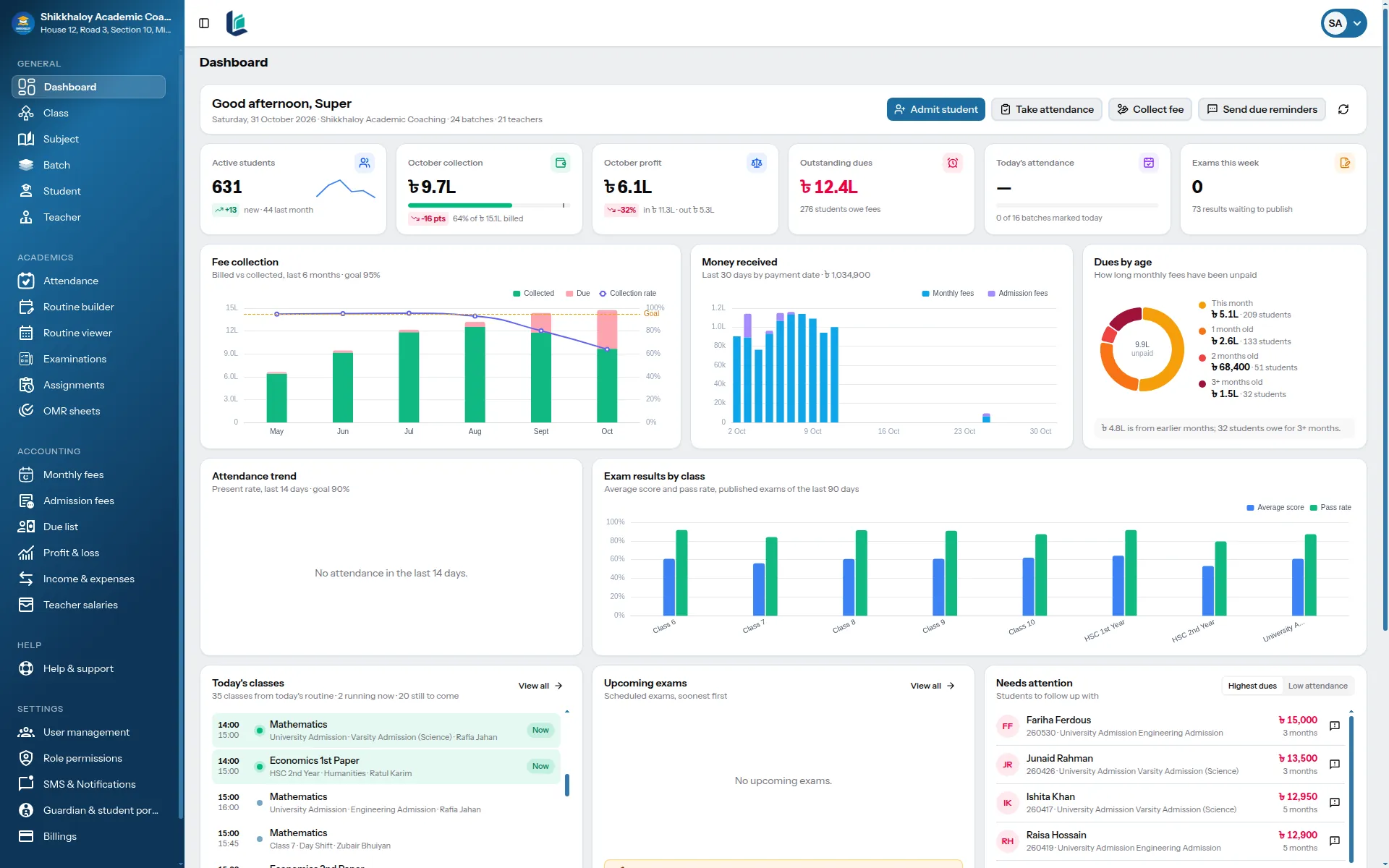
The LearnestBD dashboard: students, this month's fee collection, outstanding dues, upcoming exams and today's classes
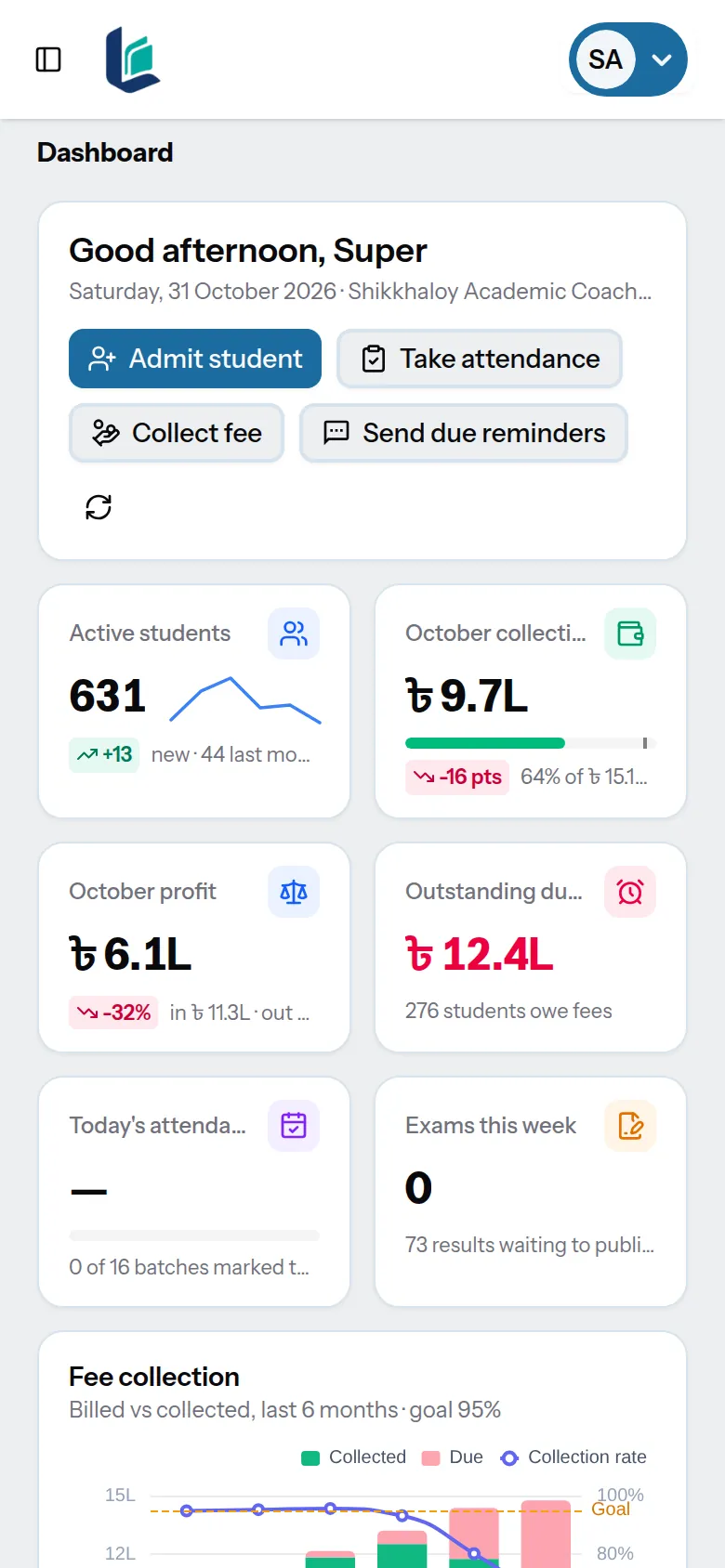
The same dashboard on a phone
  • Bangla and English
  • SMS to guardians
  • OMR checked with a phone
  • Portal for guardians and students

The month-end problem

Month end shouldn't mean a day with the register, a calculator and a list of phone numbers.

  1. 01

    Who hasn't paid yet?

    Every student's dues, by month and by batch, the moment you open the app.

  2. 02

    Who was absent today?

    Attendance takes a minute per batch, and guardians hear about it the same day.

  3. 03

    Where are last week's marks?

    Marks, results and pass rates are saved with the exam, not in a teacher's notebook.

What it does

Everything the office of a coaching center does, in one place.

01Fees

Know who owes what, without adding it up.

A fee statement is created for every student at the start of each month. Take full or part payments, print a money receipt, and see dues by student, batch or month, with a due list ready for calling.

  • Monthly statements created automatically
  • Admission fees and part payments
  • PDF money receipt in Bangla or English
  • Due reminders by SMS, on a day you choose or with one click
  • Due list by class and batch, as Excel for calling or a printable PDF
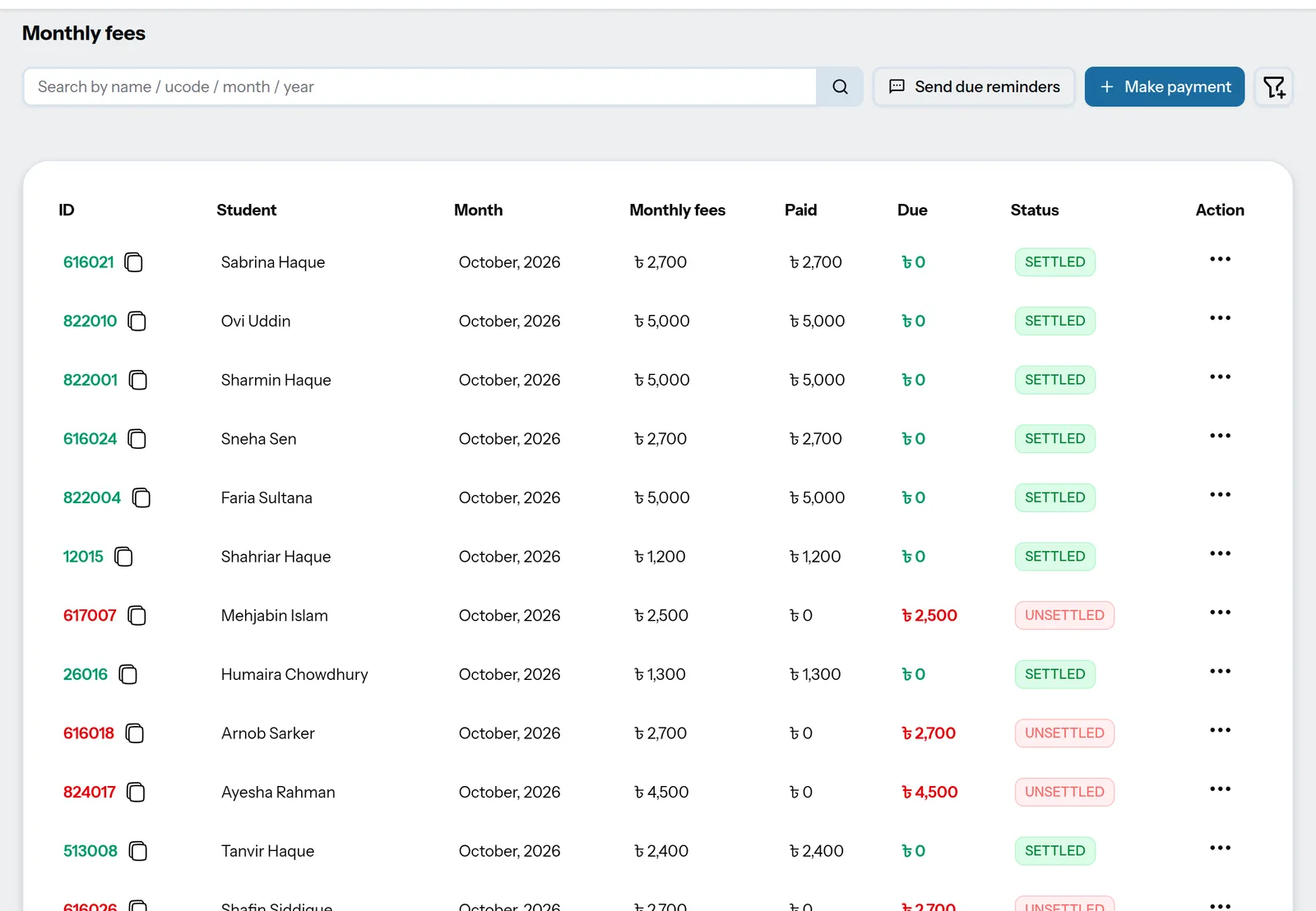
Monthly fees list with each student's fee, amount paid, due and status

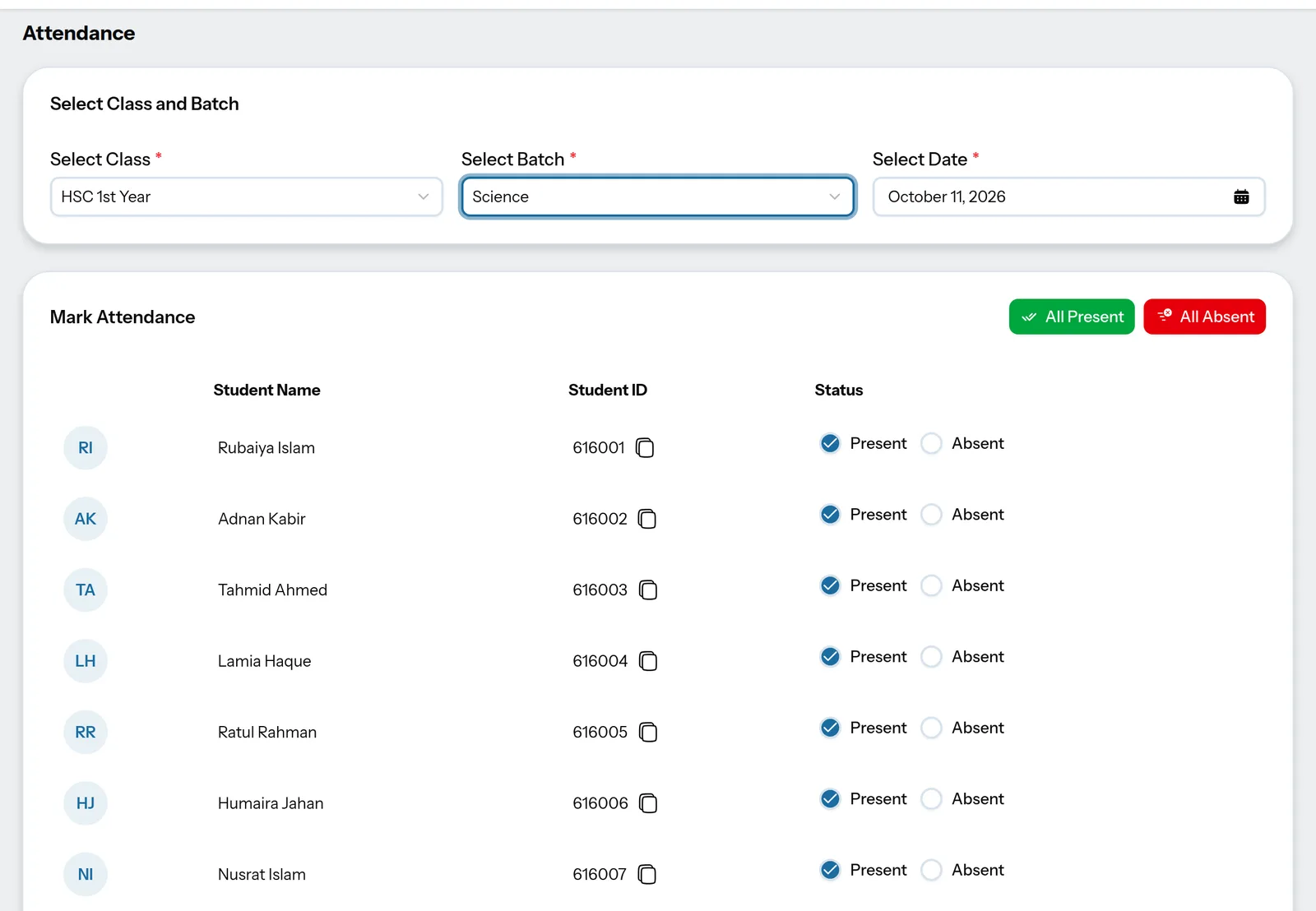
02Attendance

A minute per batch. Guardians informed the same day.

Choose the batch and everyone starts as present. Tap the few who are absent and save. If you turn it on, the guardian of each absent student gets an SMS.

  • Mark a whole batch from a phone
  • Attendance history on every student's profile
  • Absence SMS in Bangla or English
Attendance screen for HSC 1st Year Science with each student marked present or absent

03Routines

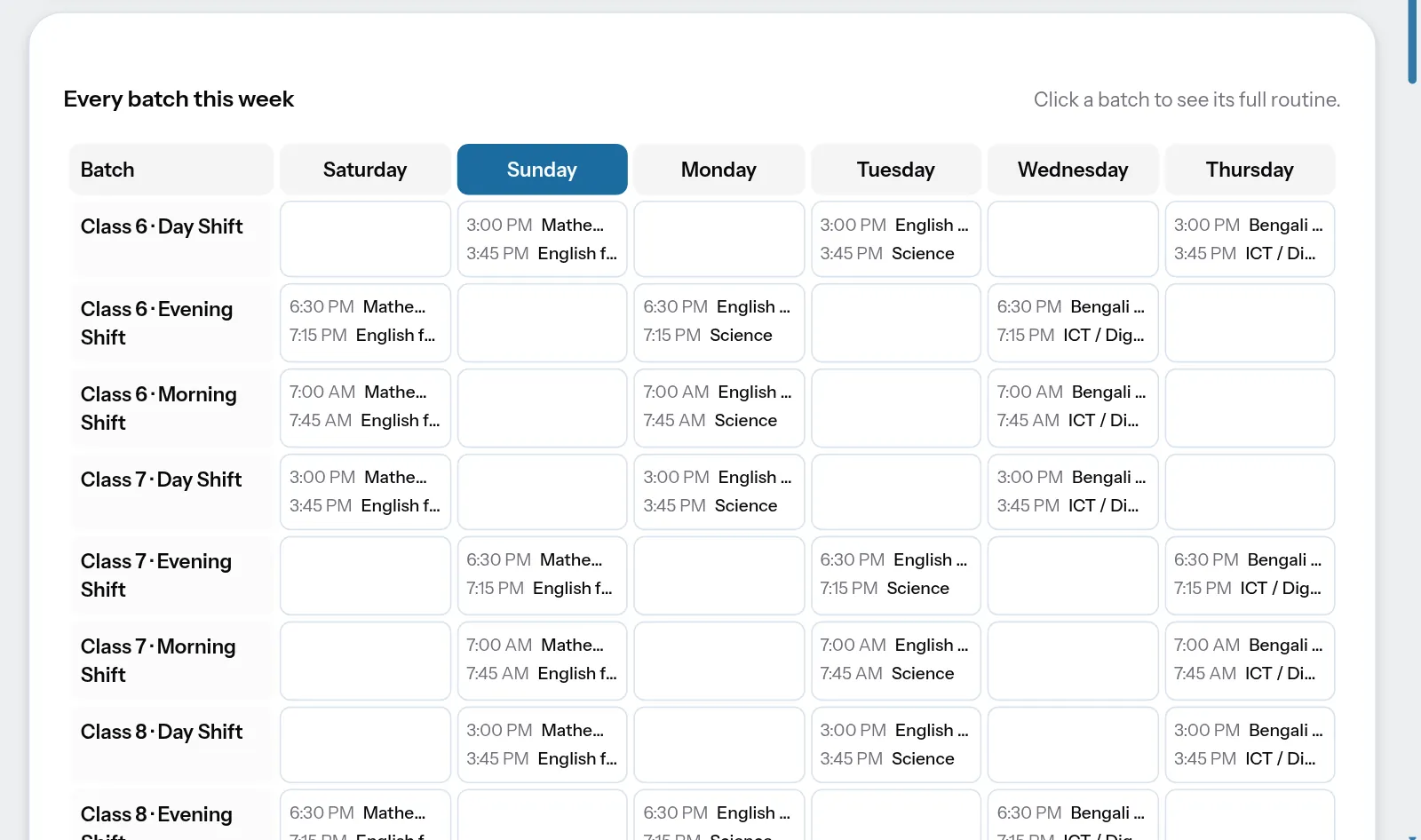
A weekly routine with no double-booked teachers.

Build the routine for each batch once. LearnestBD will not save two classes in the same slot, or a teacher in two places at the same time.

  • One routine per batch, for the whole year
  • Overlaps and teacher clashes are blocked
  • Today's classes for every batch, the whole week at a glance
Weekly routine of every batch, Saturday to Thursday, with today's column highlighted

04OMR sheets

Print OMR sheets. Check them with your phone camera.

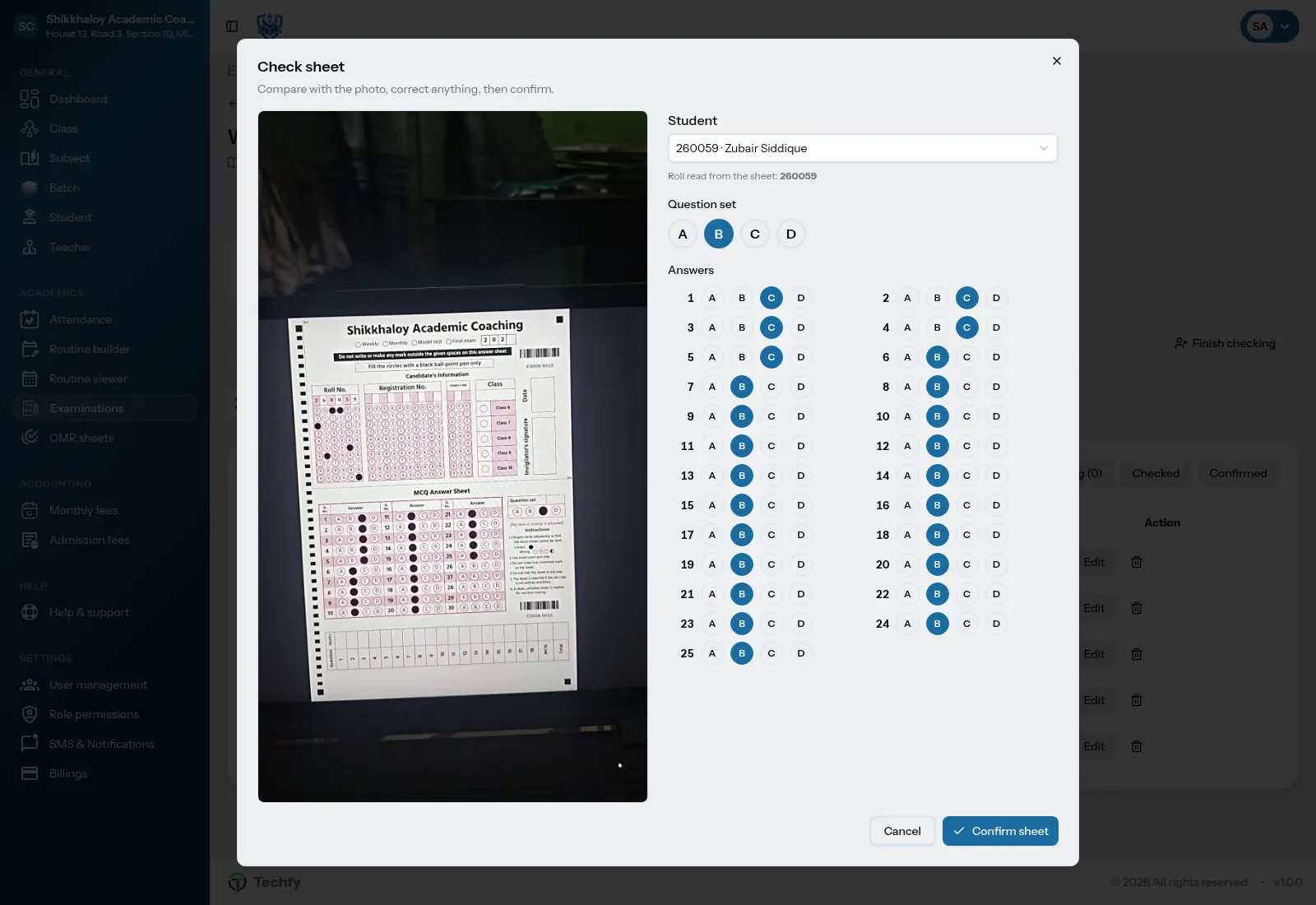
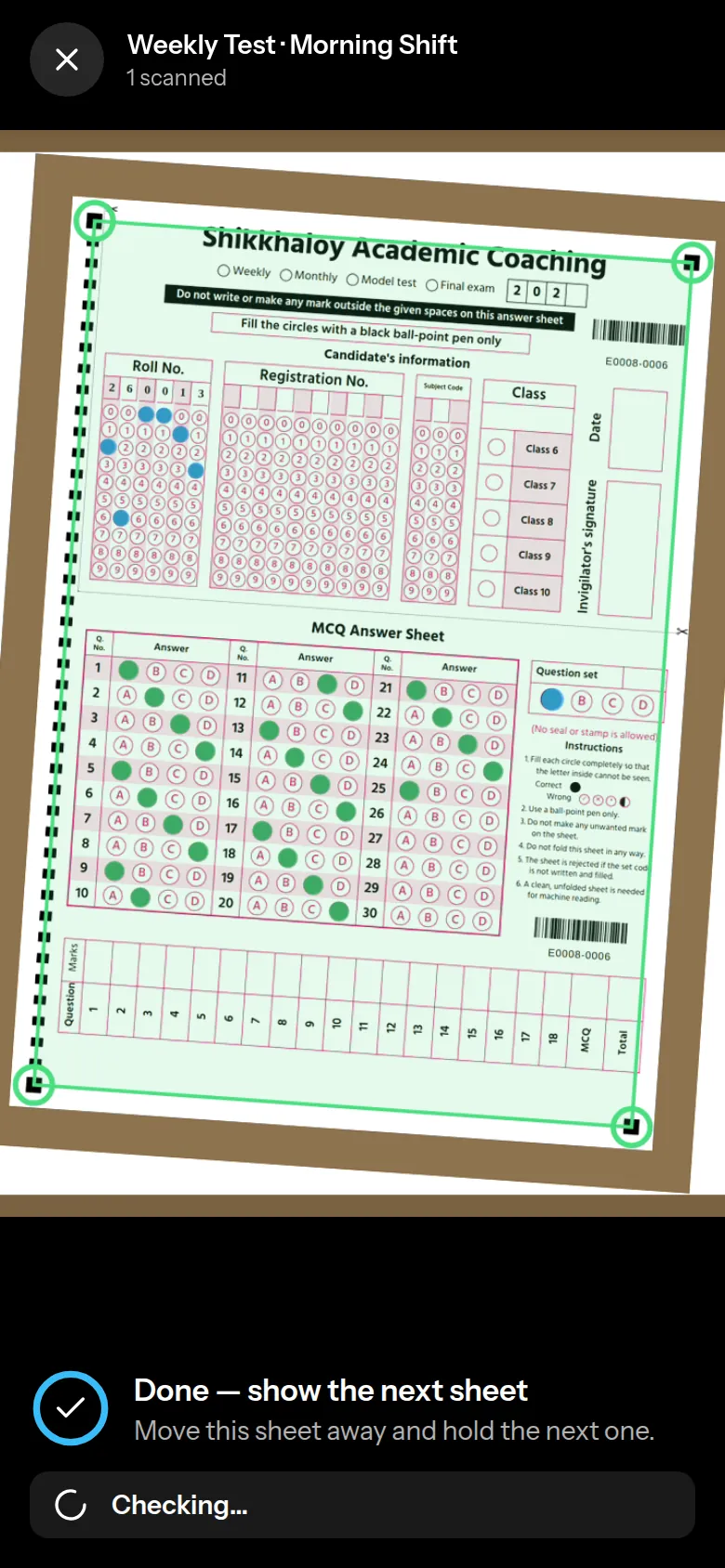
Print answer sheets with your center's name. After the exam, hold your phone over each sheet: LearnestBD finds the sheet, reads the roll and every answer, and checks it against your answer key. Marks go straight into the exam. Anything unclear is set aside for a quick look.

  • Live camera scan: hold steady and it captures by itself, even with a shaky hand
  • Answer keys for sets A–D, negative marking and cancelled questions
  • Two filled bubbles, faint marks or an unknown roll go to review with the photo
  • Board style, model test (50), admission (100) and half-page quiz sheets
Checking a scanned OMR sheet: the phone photo next to the roll, set and answers that were read
Live OMR scan on a phone: the sheet is outlined in green and every filled bubble is marked

05Exams

From marks to results, in a few minutes.

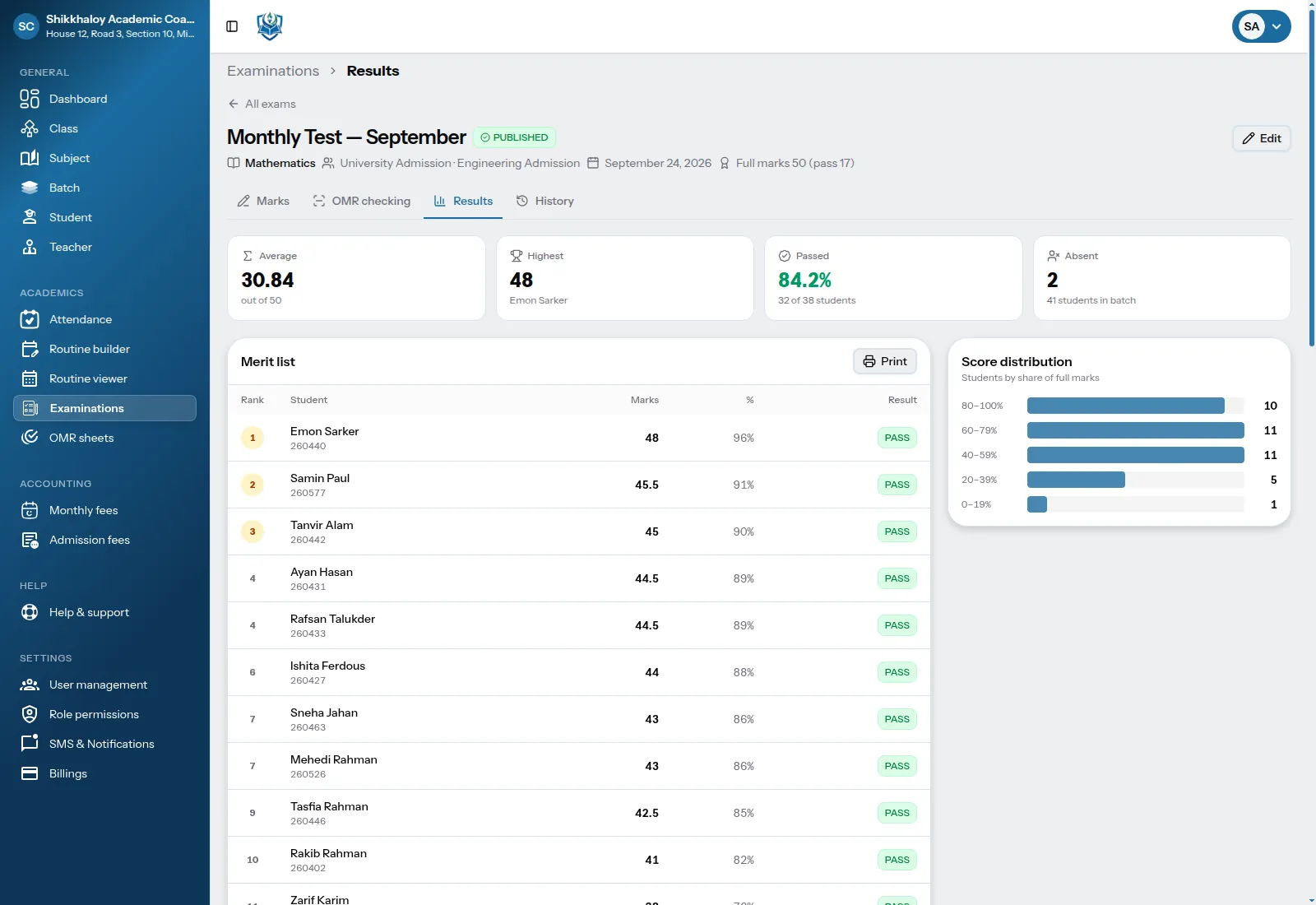
Create a test for every subject of a batch at once. Type the marks and press Enter: they save by themselves. When everyone has a mark, publish the result with a merit list, pass rate and score spread.

  • Weekly tests, model tests and term exams, one per subject in one go
  • Marks save automatically; students without a mark become absent in one click
  • Merit list with ranks, ready to print
  • Results go to guardians by SMS when you publish
Results of a monthly test: average 30.84 of 50, 84.2% passed, and the merit list with ranks

06Assignments

Give homework online. See who handed it in.

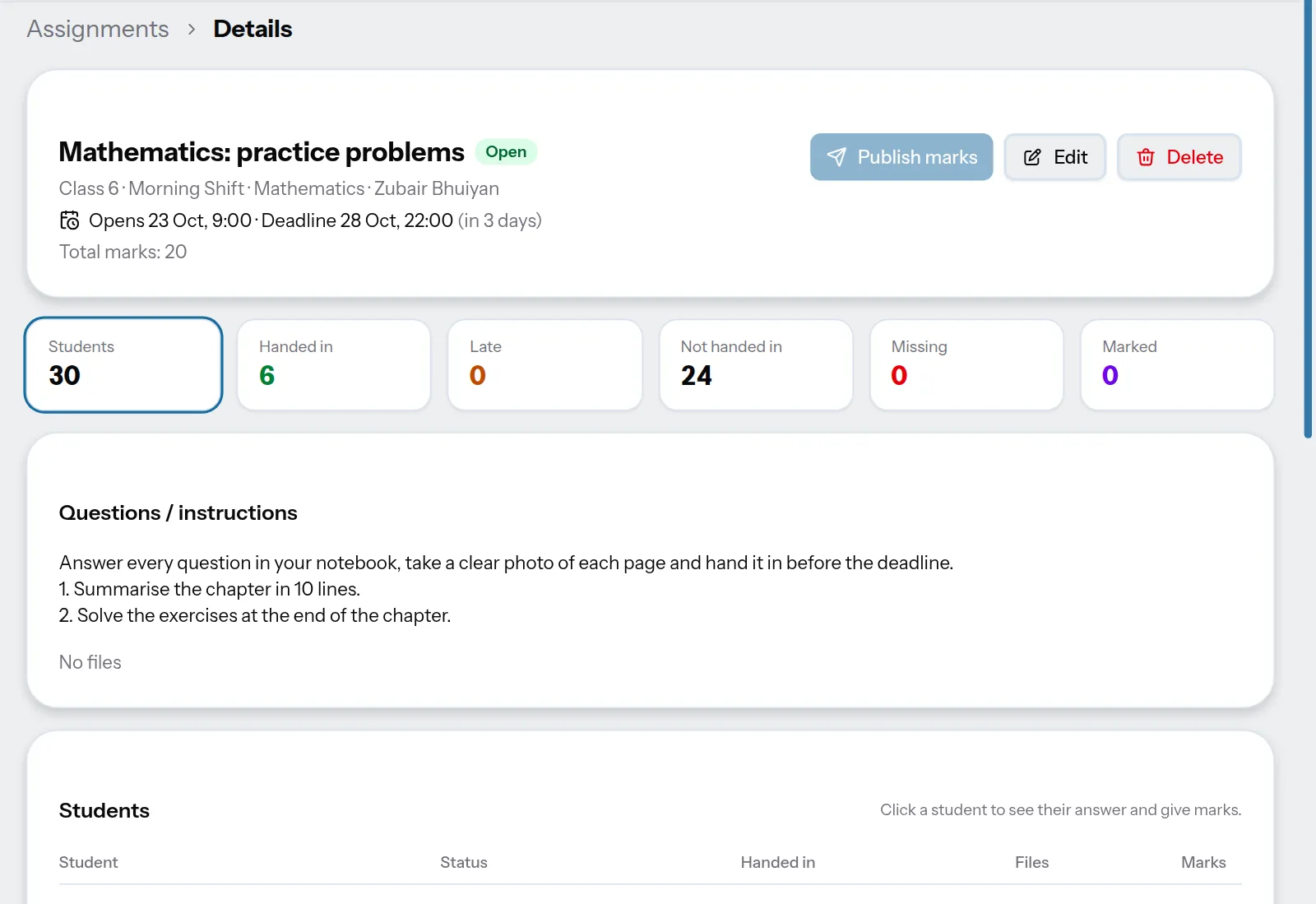
Write the questions or attach a PDF, Word file or photos, and set an opening time and a deadline. Students hand in from their phone: a photo of the notebook, a file or a typed answer. You see who handed in, who is late and who is missing, give marks and feedback, and publish the marks when you are ready.

  • Questions as text, PDF, Word, Excel, PowerPoint or photos
  • Handed in, late and missing at a glance; late answers only if you allow them
  • Marks and feedback, also for work handed in on paper
  • Teachers see only the batches they teach
An open assignment: 30 students, 6 handed in, 24 not handed in yet, with the questions and the list of students
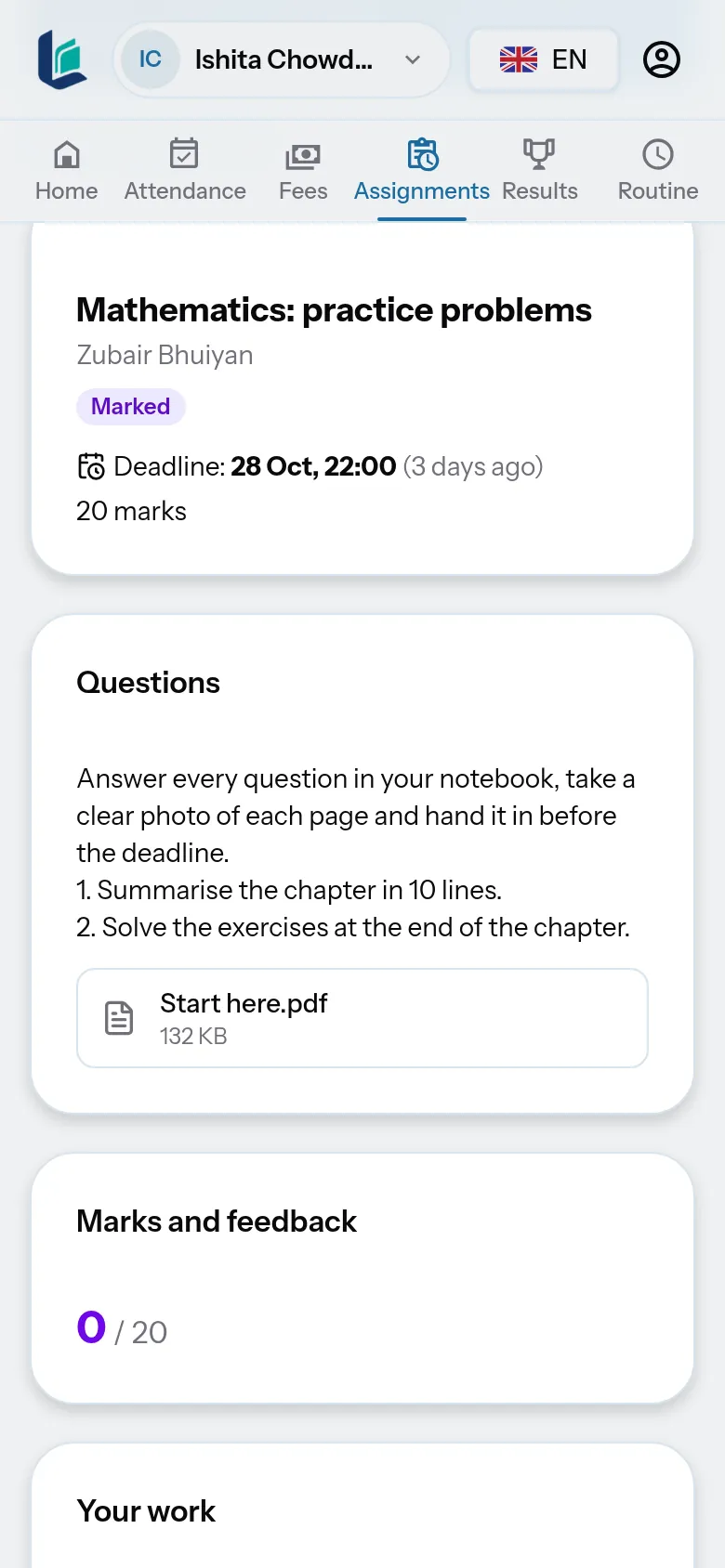
A student's phone: the assignment with its deadline, the questions and a button to add answer photos

07Guardian & student portal

Guardians see everything on their own phone.

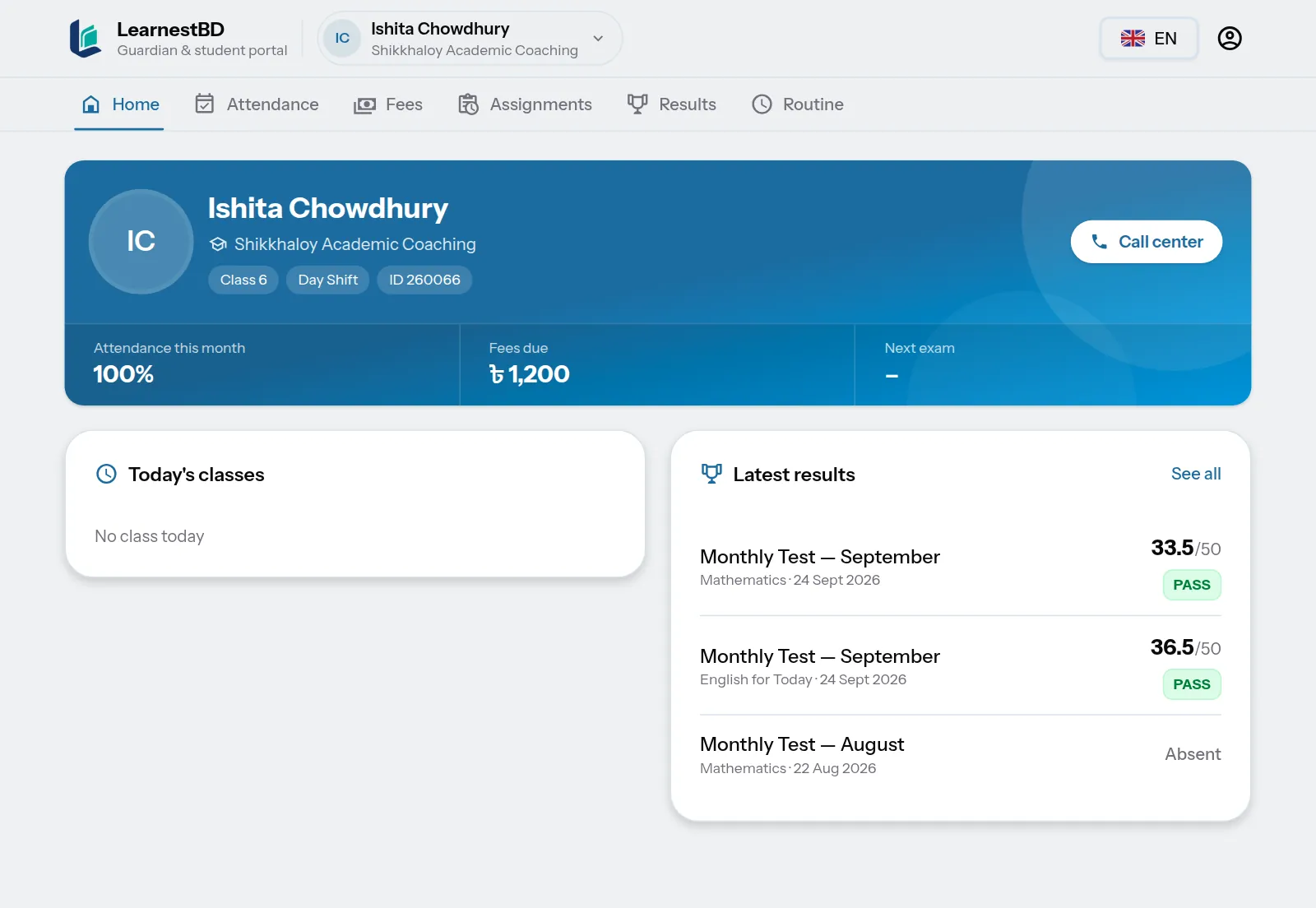
Guardians and students log in with the mobile number you already saved for the student. They see today's classes, attendance, fees and receipts, results, the routine and assignments. Fewer phone calls to the office, and guardians who know what is going on.

  • Login with the saved mobile number and a one-time SMS code; no app to install
  • Attendance calendar, fees due, money receipts and results
  • Students hand in assignments; guardians see the marks
  • One login for all the children of a guardian, even at different centers
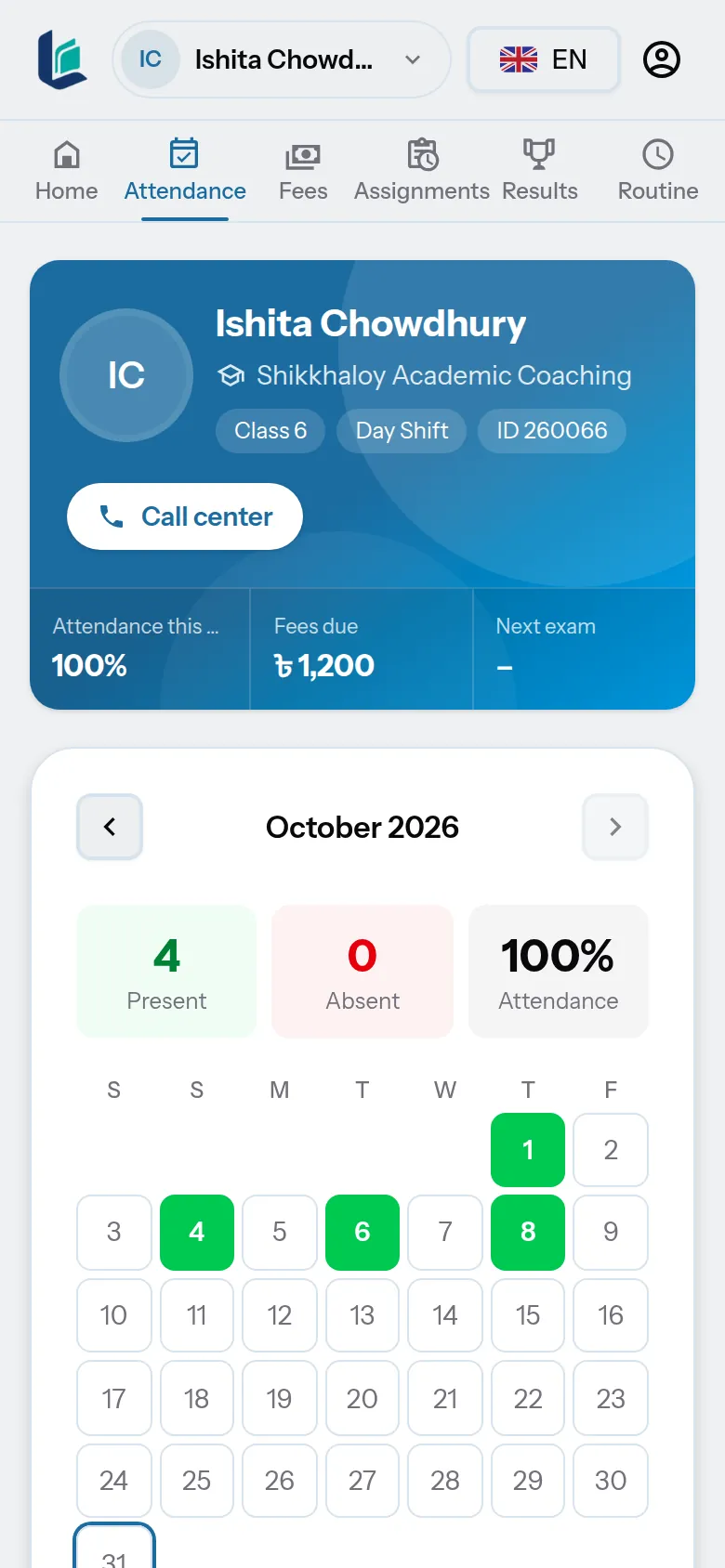
The guardian portal: the student's card with attendance, fees due and today's classes
A guardian's phone: this month's attendance as a calendar

08Income & expenses

Know if the month made a profit.

Fee collection comes in by itself. Add rent, bills, teacher salaries and other costs and income, and see the profit or loss of any month or year, with charts for the last twelve months.

  • Expenses and other income by category, with your own categories
  • Teacher salary sheet: set a monthly salary, pay one or all, part payments
  • Profit and loss by month or year, with the profit margin
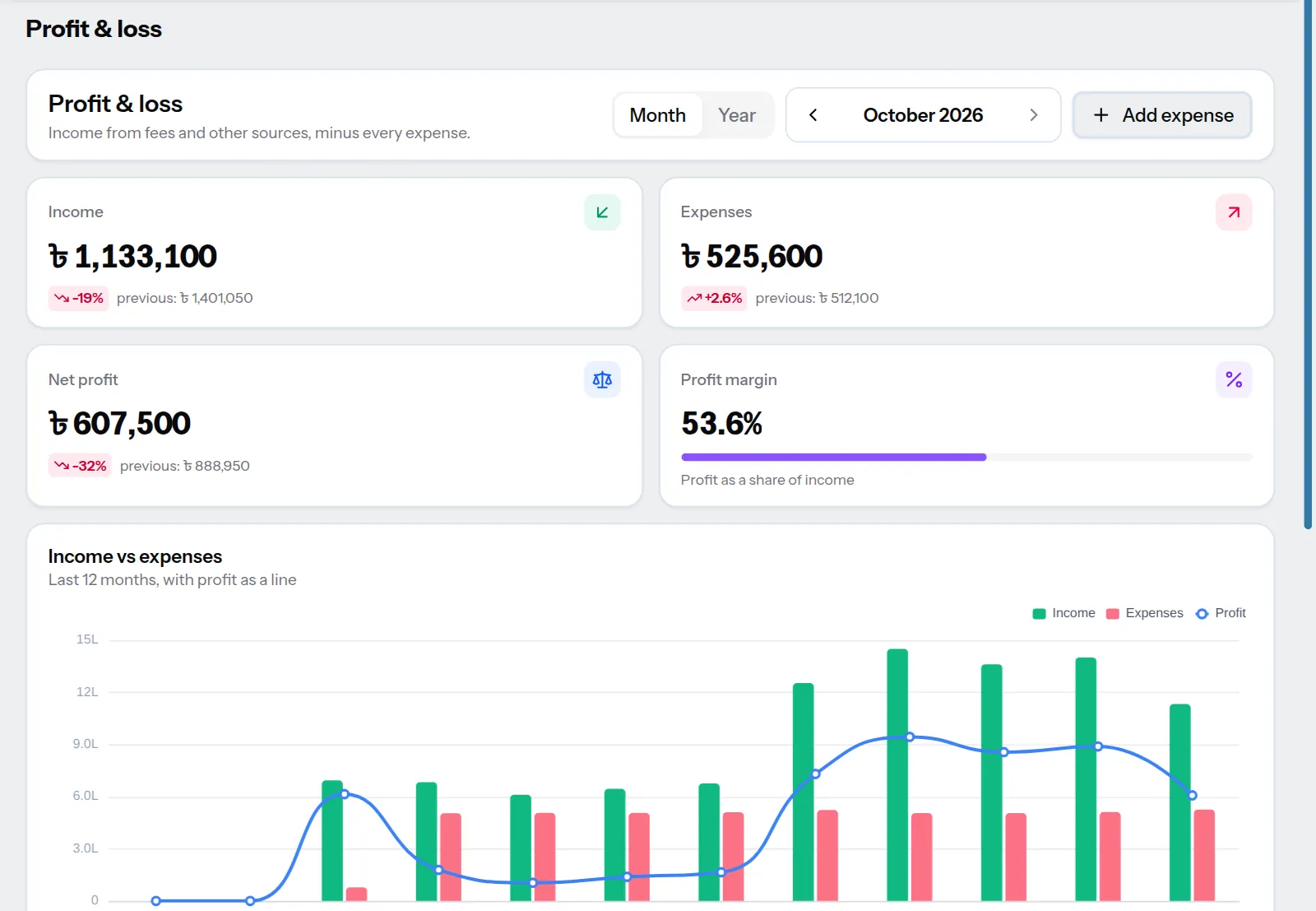
Profit and loss for October 2026: income, expenses, net profit, profit margin and a chart of income against expenses

09Students

Every student on one page.

Contact details, guardians, fees paid and due, payment history and attendance, together. No more searching three registers to answer one guardian's question.

  • Father's and mother's numbers saved for SMS
  • Fee and attendance summary at a glance
  • Bring your whole list from Excel, with every problem shown before saving
  • Admission slip to print after admitting a student
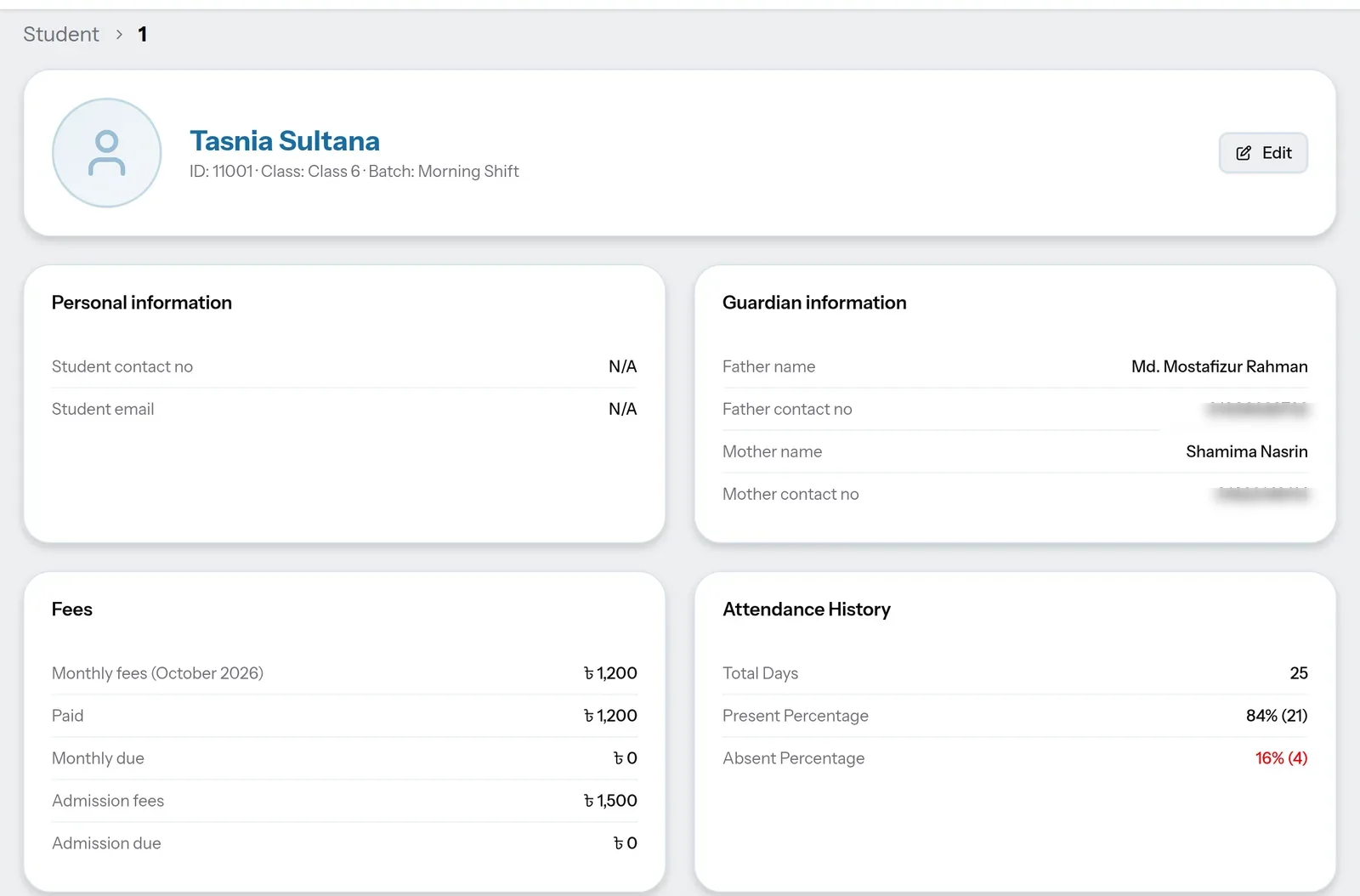
A student's profile with guardian information, fees and attendance history

How it works

One day at your center.

This is what a normal day looks like once LearnestBD is set up.

  1. 8:00 AM

    You open the dashboard. Today's classes, this month's collection and who still owes are already there.

  2. 9:15 AM

    A teacher takes attendance on their phone. Two guardians get an SMS that their child is absent.

  3. 2:30 PM

    A guardian pays ৳2,700. You save the payment and print the receipt in Bangla.

  4. 6:00 PM

    Thursday's OMR sheets are checked with a phone in a few minutes, and the result is published with a merit list.

  5. 9:00 PM

    Students hand in today's homework from their phone. Guardians check attendance, dues and results in the portal.

  6. 10th of the month

    Reminders go to guardians of students with dues. Automatically, if you want.

And also

Made for how coaching centers really work.

  • Staff with the right access

    Give your accountant fees, and your teachers attendance and marks. Nothing more.

  • More than one branch

    Add each branch as its own center and switch between them from one login.

  • Bangla or English, per person

    Every screen, receipt and SMS comes in both. Each user picks their own.

  • Your data stays yours

    Each center's students, fees and results are kept separate from every other center.

  • Classes, batches, subjects

    Set up morning and day shifts, science and humanities, admission batches. However you run it.

  • On a phone, too

    Nothing to install. It runs in the browser on a computer, tablet or phone.

  • Help when you need it

    Open a support ticket from inside the app, with a screenshot, and the LearnestBD team replies there.

  • A guided first day

    A short tour and a setup checklist show you where everything is: classes, batches, students, fees, routine.

  • Every change on record

    Each exam keeps a history of who entered or changed marks, answer keys and sheets.

  • Teachers see only their batches

    A teacher's login shows only the batches they teach in the routine: attendance, marks and assignments for those, nothing else.

  • Students who leave or pass out

    Mark them as left or passed out. Their fees, receipts and results stay; no new fees, attendance or SMS.

  • A dashboard that keeps score

    Collection rate, money received, dues by age, attendance, results and profit in charts on one page.

Pricing

One plan. Everything included.

Use every feature free for 30 days. After that, pay monthly or once a year.

Includes

  • Unlimited students and batches
  • Monthly fees, admission fees and receipts
  • Attendance, routines and exams
  • Guardian SMS for absences, dues and results
  • Staff accounts with roles
  • Bangla and English
  • OMR printing and phone checking
  • Help from the LearnestBD team
  • Guardian and student portal with assignments
  • Income, expenses, salaries and profit
LearnestBD

৳500/ month

Start your free trial

Pay with bKash, Nagad, Rocket or a bank transfer from the Billing page.

FAQ

Questions we get asked.

Do I need to install anything?

No. LearnestBD runs in the browser. Open it on a computer, tablet or phone and log in.

Can my teachers and accountant use it?

Yes. Add them as staff and choose what each role can see and do. A teacher can take attendance and enter marks without seeing your fee collection.

Is everything in Bangla?

Every screen, money receipt and guardian SMS is available in Bangla and English. Each person can switch language from the top bar.

What happens after the 30-day trial?

Pay ৳500 a month or ৳5,000 a year to keep going. If a payment is missed, the account is locked until it is paid. Your data is not deleted.

I have more than one branch.

Add each branch as a separate center. You can switch between them from the same login, and each keeps its own students and accounts.

How do I pay?

From the Billing page, pay with bKash, Nagad or Rocket, or by bank transfer. Your account is updated as soon as the payment is confirmed.

Which coaching centers is it for?

Any coaching center, tutorial home or private institute: SSC and HSC coaching, admission coaching, school batches, and language or skills courses. If you run batches and collect monthly fees, it fits.

Can I really check OMR sheets with my phone?

Yes. Print the sheets from LearnestBD, set the answer key, then open the exam on your phone and point the camera at each sheet. It reads the roll, the set and every answer, and the marks go into the exam. No scanner or extra machine is needed.

How do I get help?

Open Help & support in the app and send a ticket, with a screenshot if you like. The LearnestBD team replies in the same place, usually within a working day.

Can guardians see their child's progress?

Yes, once you turn on the guardian and student portal in Settings. Guardians log in with the mobile number saved on the student (the first time with a code sent by SMS) and see attendance, fees and receipts, results, the routine and assignment marks. Students log in with their own number and hand in assignments.

Can teachers give homework online?

Yes. A teacher sets an assignment for a batch with the questions or files and a deadline. Students hand in from the portal with photos, files or a typed answer, and the teacher marks it and publishes the marks for students and guardians.

Can I keep track of expenses and profit?

Yes. Fee collection is counted automatically. Add your expenses, other income and teacher salaries, and LearnestBD shows the profit or loss for each month and year.

Try it with your own students for 30 days.

Set up your classes and batches, add a few students, and take tomorrow's attendance in LearnestBD.